

Best External Hard Drives for Mac Users

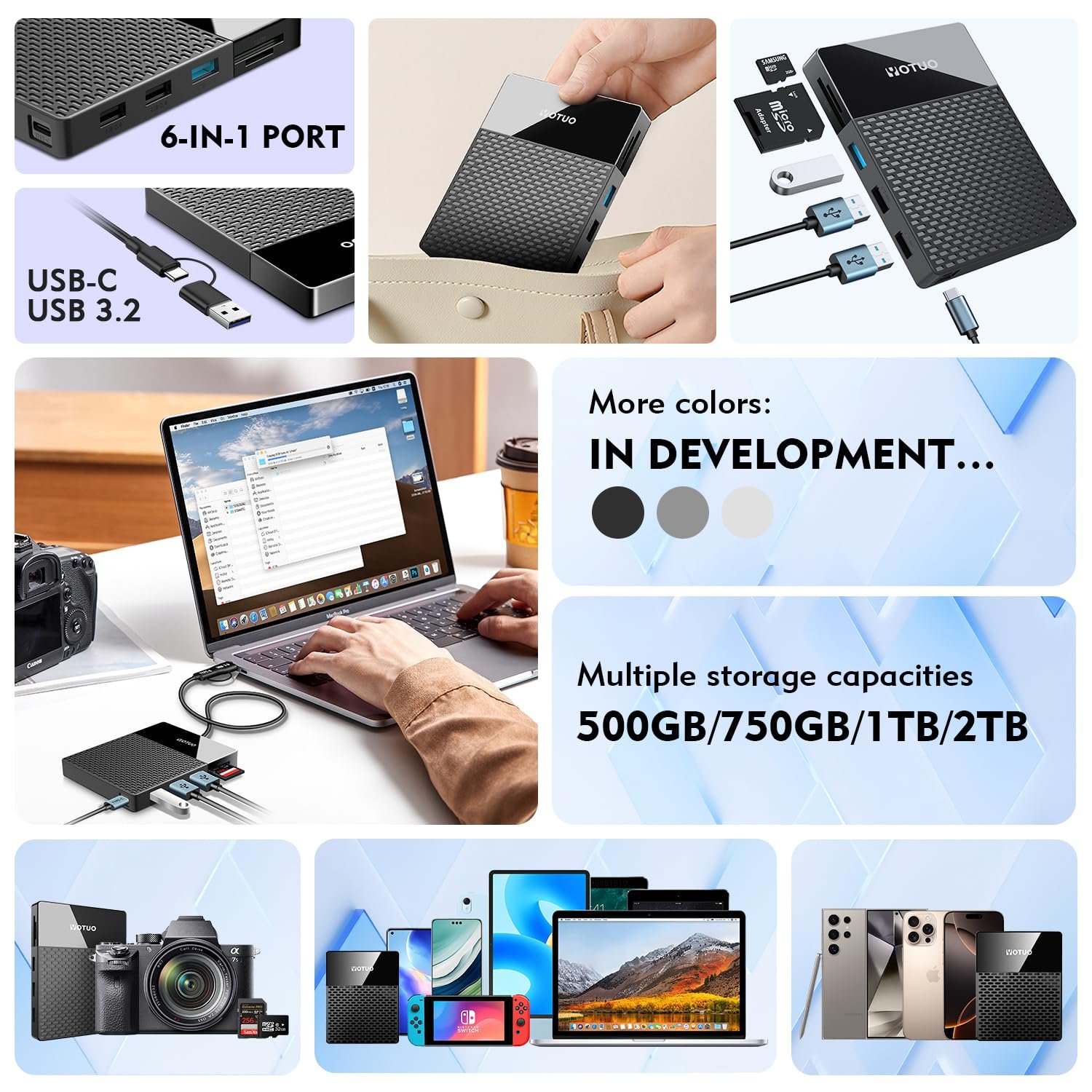
Choosing the ideal external hard drive for Mac users is more than just picking storage—it’s about enhancing workflow efficiency, protecting valuable data, and ensuring compatibility with macOS. Mac professionals and enthusiasts frequently work with large media files, multi-layered projects, and high-resolution content that demands reliable, high-speed storage solutions. SSDs (Solid State Drives) provide fast performance and durability, while HDDs (Hard Disk Drives) offer high-capacity, cost-effective storage options. Yotuo external hard drives deliver Mac-compatible storage solutions that balance speed, capacity, and security, making them suitable for casual users, creative professionals, and enterprise workflows alike.
In this comprehensive guide, we’ll break down the differences between SSDs and HDDs, explore the best external hard drives for Mac, analyze performance metrics, provide purchase recommendations, and give actionable tips for maintaining and securing your external storage.
Why Mac Users Need a High-Quality External Hard Drive
Performance Optimization for Creative Workflows
Mac users frequently handle large projects in photography, video editing, music production, and graphic design. A reliable external hard drive can:
- Expand storage without overloading internal SSDs
- Facilitate smooth editing of RAW images and 4K/8K videos
- Enable faster project transfers between devices
- Provide a backup solution via Time Machine or third-party software
macOS Compatibility and Plug-and-Play Convenience
Not all drives are optimized for Mac. Look for:
- Native macOS formats (APFS, HFS+)
- Plug-and-play support for USB-C or Thunderbolt connections
- Regular firmware updates to maintain compatibility with the latest macOS
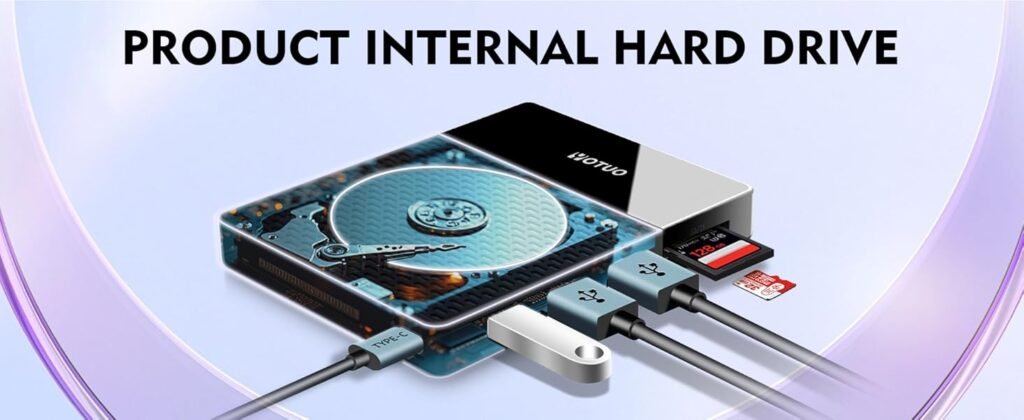
SSD vs HDD: Choosing the Right Drive for Your Mac
Solid State Drives (SSDs)
SSDs use flash memory for high-speed, reliable data storage. They are ideal for users who:
- Edit large video and photography files
- Require portability and shock resistance
- Want near-instant access to project files
| Feature | SSD |
| Speed | 500MB/s – 1GB/s |
| Durability | Shockproof, no moving parts |
| Power Consumption | Low |
| Noise | Silent |
| Best Use | Video editing, photography, on-the-go workflow |
Hard Disk Drives (HDDs)
HDDs use spinning disks and mechanical arms, offering high capacity at lower cost. Best for users who:
- Store large libraries of media or documents
- Need archival storage or backups
- Prioritize cost per gigabyte over speed
| Feature | HDD |
| Speed | 120MB/s – 200MB/s |
| Durability | Mechanical, susceptible to wear |
| Cost per GB | Low |
| Noise | Mechanical |
| Best Use | Bulk storage, backup, archival |
Yotuo external hard drives offer both SSD and HDD models, providing flexibility for Mac users to choose between speed or capacity depending on their workflow.
Connectivity and Interface Options
USB-C: The Modern Standard
- Transfer rates up to 10Gbps
- Plug-and-play compatibility with MacBook Pro, MacBook Air, and iMac
- Suitable for transferring large video or photo projects quickly
Thunderbolt 3/4: For Professional Workflows
- Speeds up to 40Gbps
- Ideal for 4K/8K video editing, multi-layer projects, and real-time rendering
- Reduces latency in professional editing and production applications
USB-A: Legacy Support
- Standard speeds of 5Gbps
- Works with older Mac devices
- Budget-friendly, though slower for large file transfers
Storage Capacity Recommendations
| Capacity | Recommended Use |
| 320GB–1TB | Casual users storing documents, music, and personal media |
| 2TB–4TB | Creative professionals, photographers, videographers |
| 4TB+ | Enterprise use, studios, large media projects |
Yotuo drives cover 320GB–2TB, providing scalable options for different Mac user needs.
Technical Considerations for Mac Users
Lifespan and Reliability
- SSDs: Measured in TBW (Terabytes Written) and offer long-term durability with minimal mechanical failure risk
- HDDs: Measured in MTBF (Mean Time Between Failures) and susceptible to mechanical wear
Power Efficiency and Heat Management
- SSDs generate less heat and consume less power, ideal for portable Macs
- HDDs consume more energy and generate more heat, which may affect long-term reliability
Security and Encryption
- Hardware AES 256-bit encryption ensures secure storage
- Password protection prevents unauthorized access
- Yotuo external hard drives include encryption options suitable for personal and professional data protection
Brand Comparisons and Recommendations
Top External Hard Drives for Mac
| Brand | Type | Capacity | Speed | Best Use |
| Yotuo External Hard Drive | SSD/HDD | 320GB–2TB | 500MB/s–1GB/s | Video editing, photography, professional workflow |
| Samsung T7 Shield | SSD | 500GB–2TB | 1GB/s | Portable editing, travel |
| WD My Passport SSD | SSD | 500GB–2TB | 540MB/s | Backup, mobile workflow |
Why Yotuo is Perfect for Mac Users
- macOS-ready (APFS, HFS+)
- Rugged, portable design for travel and fieldwork
- AES 256-bit encryption for security
- Wide capacity range (320GB–2TB)
- Cross-platform compatibility for collaborative projects
Best Practices for File Management
Organization and Workflow
- Use Time Machine for automated backups
- Separate active projects on SSDs and archival files on HDDs
- Maintain consistent folder and file naming conventions
Maintenance and Handling
- Avoid extreme temperatures and moisture
- Always safely eject drives
- Keep firmware updated to ensure optimal performance
Security Protocols
- Enable hardware-based AES 256-bit encryption
- Use strong passwords and secure storage
- Backup critical data to secondary drives or cloud storage
Real-World Use Cases
Photography and Video Editing
- Store RAW and 4K/8K video on SSDs for fast editing
- Archive completed projects on HDDs
- Use Yotuo 2TB SSD for mobile, on-location editing
Music and Audio Production
- Manage large audio libraries and multi-track sessions
- Transfer projects between collaborators efficiently
- Backup older sessions on high-capacity HDDs
Gaming and Media Storage
- Expand Mac storage for games and large media collections
- Reduce load times with SSDs
Professional Studios and Enterprises
- RAID configurations for multi-user access
- Encrypted drives protect sensitive client data
Advanced Tips and Optimization
Leveraging SSD Caching
- Combine SSD and HDD for hybrid solutions
- Store frequently accessed files on SSD and archival data on HDD
Automating Backups
- Schedule incremental backups using Time Machine or third-party software
- Ensure redundancy by combining external drives and cloud storage
Performance Testing
- Benchmark read/write speeds for your workflow
- Use software like Blackmagic Disk Speed Test for video editing workflows
- Monitor drive health with manufacturer utilities
Frequently Asked Questions
-
Are SSDs necessary for Mac users?
- SSDs provide speed, durability, and portability essential for creative workflows.
-
Can HDDs still be useful?
- HDDs are ideal for high-capacity storage, backups, and archival purposes.
-
Are Yotuo drives reliable with Mac?
- Yes. Yotuo external hard drives are macOS-compatible, durable, and secure.
-
What capacity should Mac users choose?
- 320GB–1TB for casual users, 2TB–4TB for professionals, and higher for enterprise storage.
-
How can I ensure my data is safe?
- Enable encryption, use strong passwords, maintain backups, and safely eject drives.
Choosing the right external hard drive for Mac users is about balancing speed, capacity, and security. SSDs offer fast, reliable, and portable solutions for creative professionals, while HDDs provide cost-effective high-capacity storage for backups and archives. Brands like Yotuo deliver versatile SSD and HDD options that are fully compatible with macOS, rugged, and secure. By assessing your workflow, storage needs, and budget, you can select the ideal external hard drive to optimize your Mac experience and protect your valuable data.